Dreaming Digital Note Templates: Elevate Your Digital Planning
There is a distinct difference between simply taking notes and building a system that actually works. If you have ever found yourself staring at a blank digital page in Goodnotes or Notability, unsure of how to structure your thoughts, you understand the friction of starting from scratch. This is where having a robust set of design assets becomes less about aesthetics and more about pure utility. The Dreaming Digital Note Templates collection is engineered to bridge that gap, offering a massive library of 420 individual PDF files that transform chaotic brainstorming into organized, actionable plans.
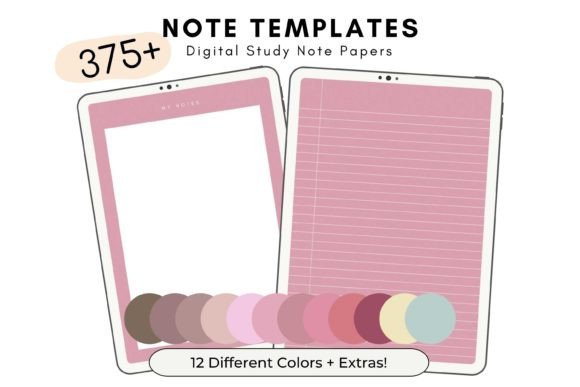
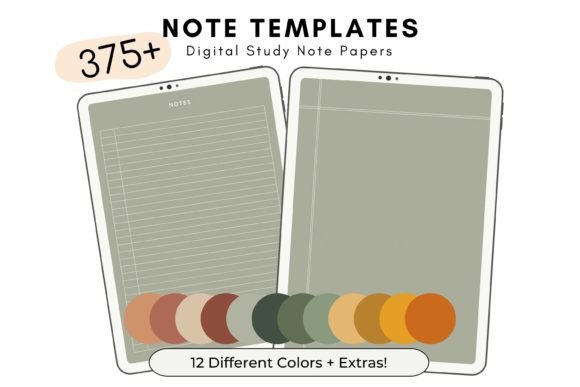
As a creative professional or entrepreneur, your digital workspace is just as important as your physical one. Whether you are a designer sketching out wireframes, a marketer planning a content calendar, or a student synthesizing complex research, the medium shapes the message. This collection is not just a random assortment of grids; it is a carefully curated system that provides 33 different note template styles, a dedicated weekly planner, and a comprehensive to-do list. The real strength lies in the versatility—it is designed to adapt to the way you think, not force you into a rigid mold.
The Anatomy of a Functional Digital Notebook
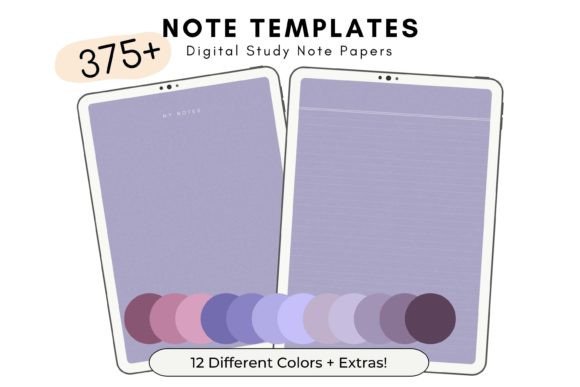
What makes a digital template effective? It comes down to visual hierarchy and cognitive load management. A well-designed template guides your eye, making it easier to prioritize information. The Dreaming Digital Note Templates excel here because they offer variety without chaos. You are not locked into a single aesthetic. Instead, you get 12 distinct color shades, allowing you to code your projects visually. Perhaps you use the "Calm Blue" for client work and "Vibrant Coral" for personal creative projects. This color coding acts as a mental trigger, helping you switch contexts faster.
The visual style of these templates leans into clean, modern typography principles. They avoid the "busy" look that plagues many printable planners. Instead, they prioritize whitespace and legibility. This is crucial for readability. When you are reviewing notes on a tablet or a bright monitor, high contrast and clean lines reduce eye strain. The personality of the set is professional yet approachable—it doesn't feel like a corporate memo, but it also doesn't look like a scrapbook page. It hits that sweet spot required for serious work that still needs a touch of creative flair.
Practical Applications for Professionals
For the brand strategist or marketer, consistency is key. Using the same template structure across a campaign ensures that your team is always on the same page—literally. Imagine setting up a shared notebook where everyone uses the "Weekly Planner" style for status updates and the "Dot Grid" style for brainstorming. This creates a unified brand identity within your internal workflow, which often translates to more cohesive external output.
Designers and content creators will find the variety of 33 styles particularly liberating. Sometimes a lined page restricts the flow of a logo sketch; other times, a strict grid is necessary for layout planning. Having access to lined, blank, dotted, and gridded variations means you have the right tool for every stage of the creative process. It removes the barrier between having an idea and capturing it effectively.
Maximizing Your Workflow with 420+ Assets
The logistics of this set are designed for heavy usage. Receiving a single .ZIP file containing 420 individual PDFs grouped by color is a massive advantage for file management. Instead of downloading one massive 400-page PDF and spending hours separating pages, you have immediate access to specific sheets. This modularity is a massive time-saver. It allows you to build custom notebooks on the fly.
Consider the power of the 10 bonus notebook covers included in the set. While it might seem like a small detail, a distinct cover is essential for visual recognition when you have multiple projects open in your annotation app. It reinforces the feeling of holding a physical object, which many users find psychologically grounding in a digital environment.
Here is how you can practically integrate these assets into your routine:
- The "Sunday Reset": Use the Weekly Planner template every Sunday to map out your priorities. The structure helps you see the week at a glance, preventing overcommitment.
- The "Brain Dump": For high-level ideation, use a blank or dot-grid style from the Dreaming Digital Note Templates. This allows for non-linear thinking, perfect for content creators plotting video scripts or entrepreneurs sketching business models.
- The "Daily Grind": Utilize the To-Do List templates for daily execution. There is a specific satisfaction in the tactile experience of checking off a digital box with your stylus, which reinforces productivity habits.
Color Theory and Project Organization
The inclusion of 12 different shades is not just about making things pretty; it is a functional organizational tool. In web design and editorial design, we often talk about "chunking" information to make it digestible. You can apply this same theory to your planning. By assigning a specific color to a specific area of your life—finance, health, creative work, admin—you create an instant visual filing system. When you open your tablet, your eyes are immediately drawn to the correct project without needing to read labels.
Furthermore, the aesthetic appeal of the templates should not be underestimated. If you are a blogger or publisher, you might take screenshots of your planning process to share with your audience. Using a cohesive, beautiful set of templates like this enhances your professional image. It shows that you value organization and have a curated approach to your work, which builds trust with your audience.
Evaluating Fit and Usability
While these are marketed as study notes templates, their utility extends far beyond academia. The "US Letter Size" (8.5 x 11 inches) is the industry standard for screen sharing and printing, ensuring that your notes look right on any device. The fact that they can be used in Goodnotes or "almost any app that allows PDF annotation" means you aren't locked into a specific ecosystem. Whether you use an iPad, an Android tablet, or a desktop PDF reader, these assets remain functional.
When evaluating if this set fits your needs, consider your input method. If you use a stylus (like the Apple Pencil), the responsiveness of the PDF file is critical. High-quality PDFs, like those provided here, ensure there is no lag between your hand movement and the ink appearing on the page. This fluidity is vital for maintaining a "flow state" while working.
Ultimately, the Dreaming Digital Note Templates provide a framework for success. They strip away the technical hurdles of setting up a digital workspace so you can focus on what matters: the work itself. For the designer, marketer, or small business owner looking to streamline their digital life, this collection offers a blend of aesthetic refinement and practical utility that is hard to beat. It is a reminder that good organization is the foundation of great creativity.