Crystal-Clear Branding: Using Editable Candle Label Templates
There is a specific kind of frustration that hits when you have a beautiful candle poured, cured, and ready to go, but the packaging looks like an afterthought. In the crowded artisan market, the label is often the first tactile interaction a customer has with your product. It needs to communicate the scent profile, the brand ethos, and the quality of the wax inside, all within a few square inches. This is exactly where the Crystals Candle Label Templates Editable collection finds its footing. It bridges the gap between a raw product and a market-ready item, offering a sophisticated starting point that doesn't require a graphic design degree to execute.
When you purchase this asset, you aren't just buying a static image. You receive a digital file—a PDF containing a direct link to your customizable template hosted on Canva. This approach modernizes the design process. Instead of wrestling with complex software like Adobe Illustrator or InDesign, the workflow is streamlined into a browser-based or mobile app experience. The template size is standardized at 3 inches by 3 inches, a versatile dimension that fits the base or the belly of most standard candle jars, from the 8oz tumbler to the larger apothecary vessels.
The Visual Language of Crystals and Luxury
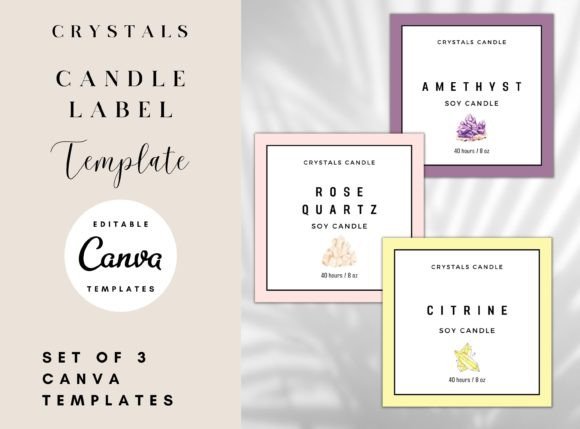
The "Crystals" aspect of the design language is critical to understand before you start editing. This isn't just a random collection of shapes; it is a curated visual style that leans into the metaphysical and aesthetic appeal of geodes, quartz, and semi-precious stones. Visually, these templates often utilize soft gradients, faceted geometric lines, and a palette that mimics amethyst, rose quartz, or clear crystal structures. The personality of these templates is inherently serene, spiritual, and high-end.
However, the real value lies in the editability. The templates are described as "highly editable," which is a crucial distinction from "fill-in-the-blanks." You have the agency to alter the foundational elements to match your specific brand identity. If your candle line is "Earthy & Grounding," you can shift the color palette from pastel purples to deep forest greens and amber golds. If your brand is "Modern & Minimalist," you can strip away the ornate crystal illustrations and keep only the geometric wireframes, pairing them with a clean sans serif font for a stark, contemporary look.
The typography included or suggested within these layouts usually favors elegance. You will likely encounter script fonts or handwritten fonts for the scent names to add a human touch, balanced by a legible serif font for the smaller regulatory text. Because the template is editable, you aren't locked into these choices. You can upload your own premium font files to Canva and replace the defaults, ensuring your logo and wordmark remain the hero of the design.
Practical Application: Beyond the Jar
While the primary use case is packaging design for wax products, limiting these assets to just candle jars is a missed opportunity for content creators and small business owners. The 3x3 inch format is incredibly flexible in the wider world of marketing and publishing.
- Sticker Sheets & Seals: Use the templates to create wax seals or stickers for shipping boxes. A cohesive unboxing experience is a powerful marketing tool for e-commerce brands.
- Social Media Graphics: The square format is native to Instagram. You can screenshot your label design or export the elements to create cohesive posts, stories, or highlight covers that maintain that "crystal" aesthetic.
- Hang Tags: While the template is 3x3, you can adapt the elements within the canvas to create rectangular hang tags for gift sets, adjusting the layout to fit a 2x4 inch space without losing the visual integrity.
- Digital Products: If you are a blogger or content creator in the wellness niche, you can use these designs as cover art for digital planners, meditation guides, or e-books.
The versatility of the editable design assets means you can maintain visual consistency across your entire brand identity. Your Instagram feed can match your physical product, which matches your thank-you cards. This level of professionalism signals to the customer that you are serious about your craft.
Design Strategy: Making the Template Your Own
The biggest trap with templates is leaving them exactly as they are. If you use the default colors and fonts, your product will look generic. Here is how to approach the editing process like a professional designer:
- Evaluate Your Niche: Look at the Crystals Candle Label Templates Editable collection and identify which base layout aligns with your customer. Is your audience into witchy, boho vibes? Lean into the purple and gold presets. Are they luxury minimalists? You need to simplify the design, perhaps removing the crystal illustrations entirely and focusing on the typography.
- Font Pairing is Key: A common mistake is using two script fonts together, which creates chaos. If the template uses a flowing script for the title, pair it with a sturdy, spaced-out sans serif font for the weight (e.g., "8 oz / 226g"). This creates a visual hierarchy that guides the eye from the scent name to the practical details.
- Check Readability at Scale: On a computer screen, text looks large. On a 3-inch label, it is tiny. Before printing a full batch, print a test sheet at 100% scale. Can you read the ingredients list? Is the font too thin? Sometimes, swapping a delicate handwritten font for a bolder display font is necessary for legibility.
- Color Psychology: Use the color picker tool in Canva to match the hex codes of your logo. Do not eyeball it. Precision in color creates a subconscious feeling of reliability and professionalism.
Accessibility and Workflow
It is important to note the technical requirement: a FREE Canva account is required to open and edit these templates. This is a significant advantage for entrepreneurs and hobbyists who may not want to invest in expensive annual subscriptions for desktop software. The ability to edit on your phone via the Canva app also allows for rapid prototyping. You could be at a craft fair, realize a label needs a tweak based on customer feedback, and update the design on the spot.
When working with these creative fonts and elements, always consider the commercial licensing. Typically, assets sold on these marketplaces come with a license that allows you to sell the physical product (the candle) with the design on it. However, you usually cannot resell the digital template file itself. Always double-check the specific license agreement included with your download to ensure your commercial font and graphic usage is compliant.
Ultimately, the Crystals Candle Label Templates Editable package is more than just a shortcut; it is a launchpad. It provides the structural layout and aesthetic baseline, allowing you to focus on the storytelling and unique branding elements that make your candle business distinct. By taking the time to customize these templates deeply, you move from looking like a "template user" to a brand with a cohesive, polished, and professional visual identity.